FEFO Inventory Management: How First Expired, First Out Reduces Warehouse Waste
Learn how FEFO inventory management prioritizes items by expiration date to reduce waste, ensure compliance, and optimize picking. Step-by-step WMS setup guide.

TL;DR — ZoraTech now supports FEFO (First Expired, First Out) as a warehouse-level allocation strategy. Inventory with the nearest expiration date is automatically picked first, reducing spoilage, minimizing waste, and keeping your operation compliant. Configure it per warehouse or override it per order — no workflow changes required.
Every warehouse dealing with perishable goods, pharmaceuticals, or date-sensitive materials faces the same problem: products expire on shelves while newer stock gets picked first. The result is preventable waste, compliance risk, and margin erosion that compounds over time.
FEFO inventory management solves this by flipping the allocation logic. Instead of picking the oldest received stock (FIFO) or the most accessible (ad hoc), your WMS prioritizes inventory closest to its expiration date. The outcome is straightforward — less waste, better product quality for customers, and fewer compliance headaches.
ZoraTech’s FEFO implementation is built directly into the allocation engine, making it available across manual and automated picking workflows without changing how your team operates day-to-day.
What Is FEFO Inventory Management?
FEFO stands for First Expired, First Out. It is an inventory allocation strategy where items with the soonest expiration date are picked and shipped before items with later expiration dates, regardless of when they were received.
This differs from the more common FIFO (First In, First Out) approach, which prioritizes items based on the date they arrived at the warehouse. FIFO works well for non-perishable goods, but it can lead to unnecessary spoilage when products have varying shelf lives.
When FEFO Matters Most
FEFO is essential for warehouses handling:
- Food and beverage — fresh produce, dairy, frozen goods, packaged foods
- Pharmaceuticals and supplements — medications, vitamins, health products
- Cosmetics and personal care — products with active ingredient shelf lives
- Chemical products — reagents, cleaning supplies, agricultural inputs
- Any product with a printed expiration or best-by date
If your inventory has expiration dates, FEFO ensures those dates drive your picking decisions.
FEFO vs FIFO vs LIFO: Choosing the Right Strategy
Each allocation strategy serves a different operational need. Choosing the right one depends on the type of inventory you manage.
| Strategy | Ordering Logic | Best For | Risk If Misapplied |
|---|---|---|---|
| FEFO | Earliest expiration date first | Perishable goods, regulated products | Slower picking if expiration data is incomplete |
| FIFO | Oldest received date first | General inventory, non-perishable goods | Expired stock overlooked when shelf lives vary |
| LIFO | Newest received date first | Bulk non-perishable, commodity storage | Oldest inventory never moves, potential write-offs |
Why FIFO Alone Falls Short for Perishable Inventory
Consider a scenario: your warehouse receives Batch A of a product on January 1 with a 90-day shelf life (expires April 1). On February 1, Batch B arrives with a 30-day shelf life (expires March 3).
Under FIFO, Batch A ships first because it was received earlier. But Batch B expires a full month sooner. By the time you get to Batch B, it may already be expired or too close to its expiration date for your customer to accept.
FEFO catches this. Batch B ships first because March 3 comes before April 1. Both batches reach customers within their usable shelf life.
How FEFO Works in ZoraTech
ZoraTech’s FEFO implementation operates at three levels: data capture during receiving, strategic ordering during allocation, and visual indicators during picking.
1. Expiration Date Capture at Receiving
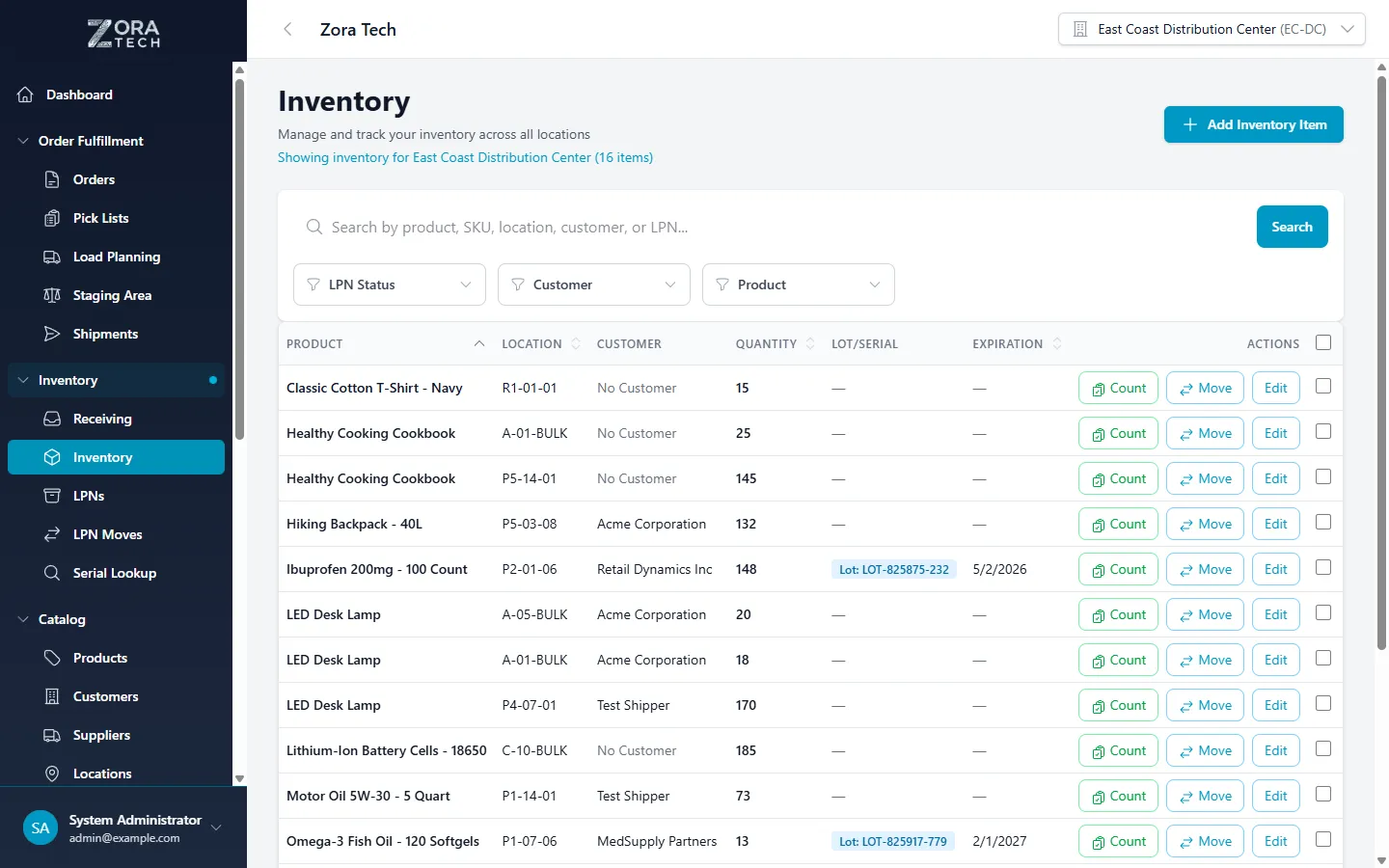
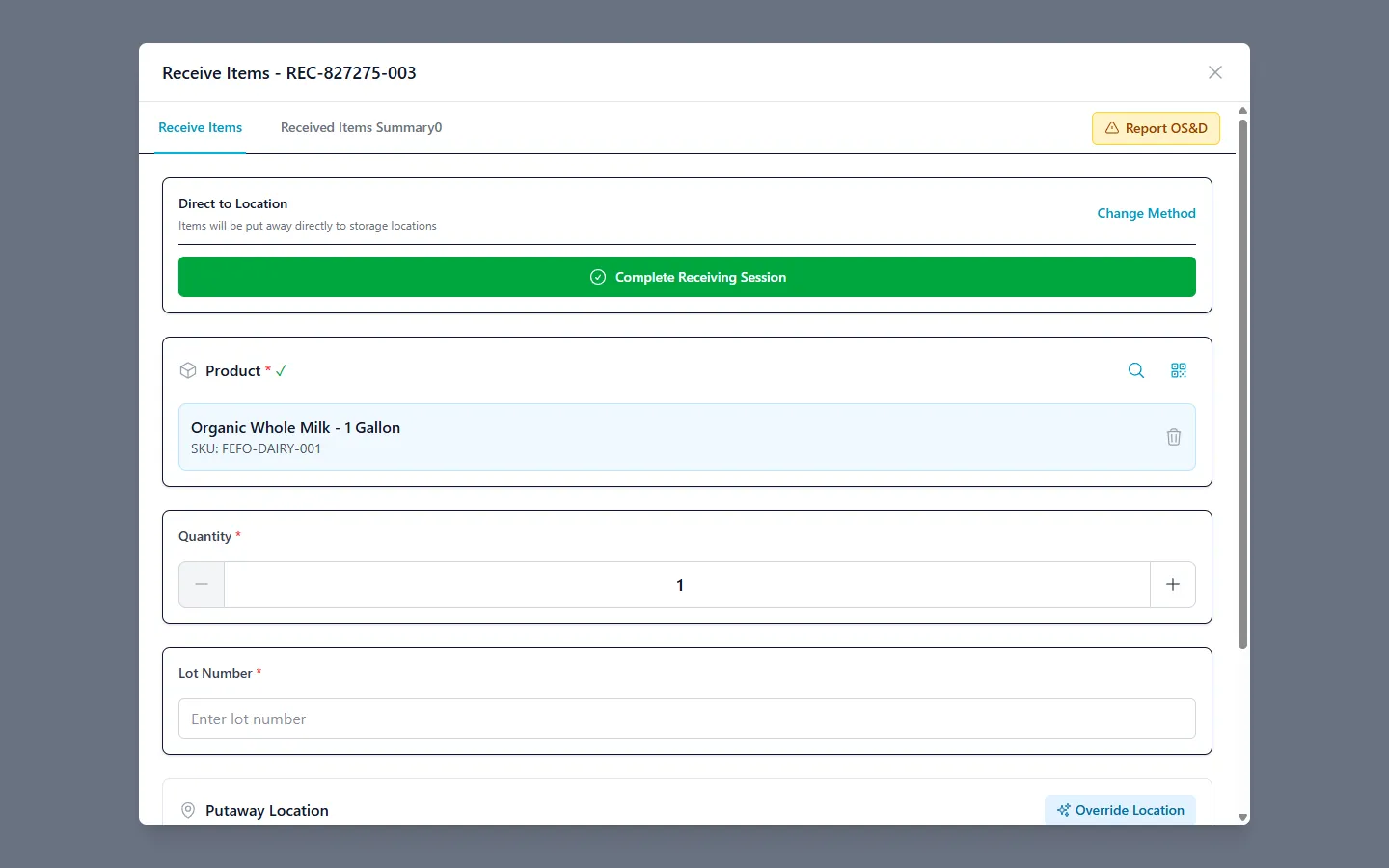
When inventory is received into the warehouse, each item or lot can be assigned an expiration date. This date is stored alongside the product’s lot number, received date, and location — forming the foundation for FEFO allocation.
Items without an expiration date are not excluded from allocation. They are simply deprioritized, appearing last in the pick sequence after all dated inventory has been allocated.
2. Allocation Engine Ordering
When an order is allocated, ZoraTech’s allocation engine queries available inventory for each product and applies the warehouse’s configured strategy. For FEFO, the ordering logic is:
- Expiration date ascending — soonest expiration first
- Received date ascending — oldest receipt as tiebreaker
- Created date ascending — system entry order as final tiebreaker
This three-tier ordering ensures deterministic allocation even when multiple inventory records share the same expiration date.
3. Visual Expiration Indicators
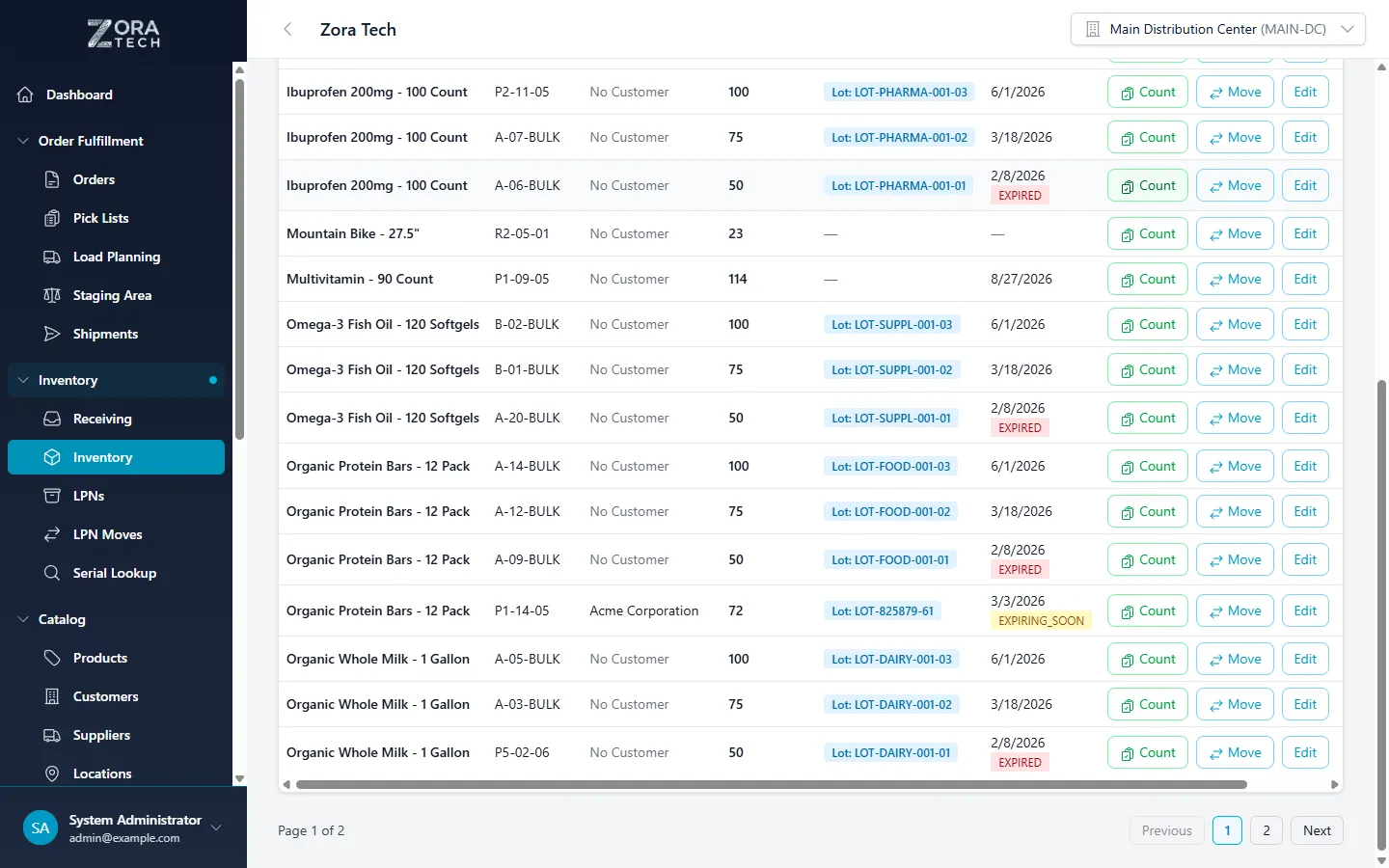
Throughout the platform, inventory records display expiration status with color-coded badges:
| Badge | Condition | Meaning |
|---|---|---|
| Expired (red) | Expiration date has passed | Item should not be shipped |
| Expiring Soon (yellow) | Within 30 days of expiration | Prioritize for next allocation |
| Normal (green) | More than 30 days remaining | Standard shelf life |
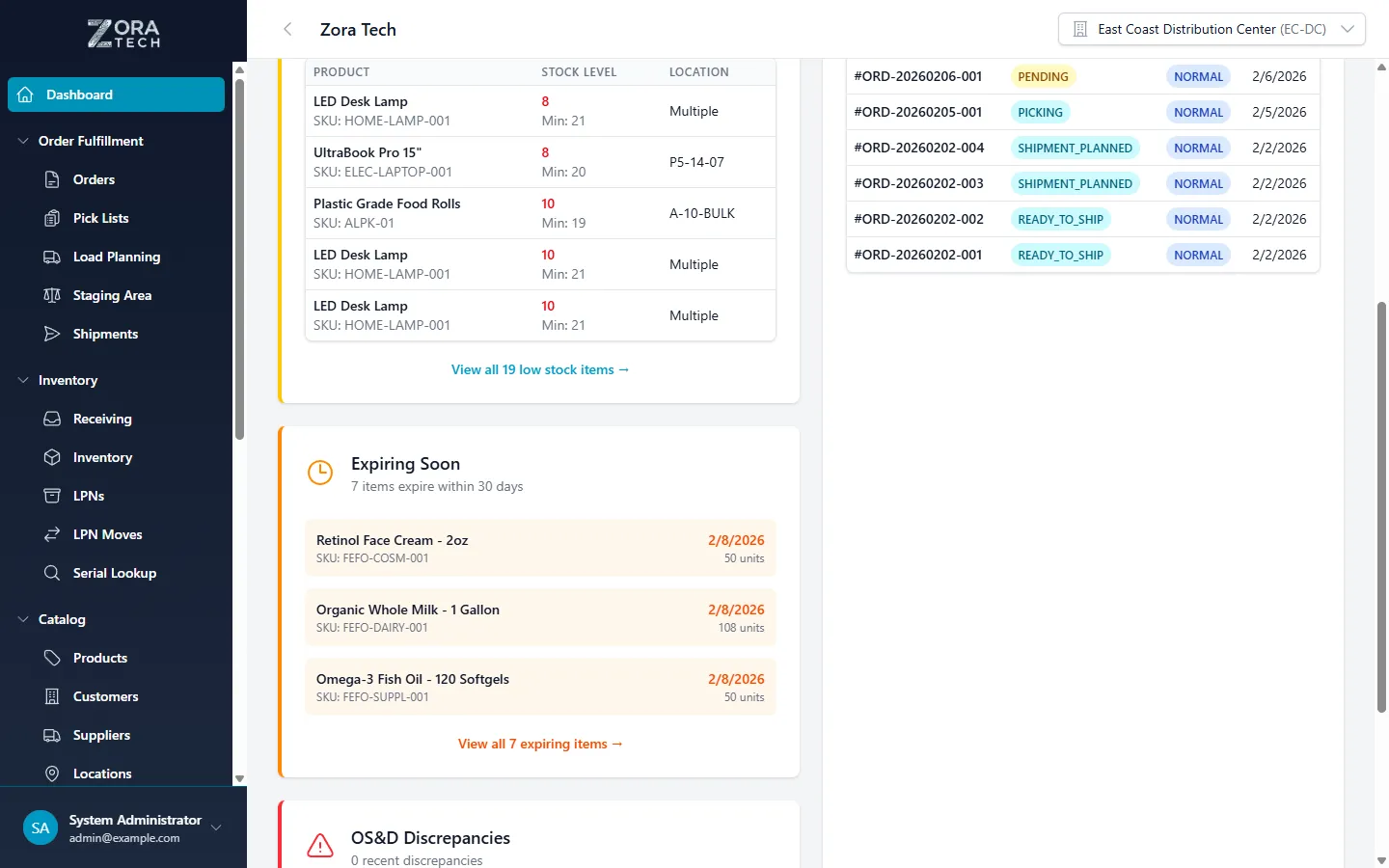
These indicators appear in inventory detail views, allocation modals, and location search results, giving warehouse staff immediate visibility into product freshness.
Setting Up FEFO in Your Warehouse
Configuring FEFO requires two steps: setting the warehouse default strategy and ensuring expiration dates are captured during receiving.
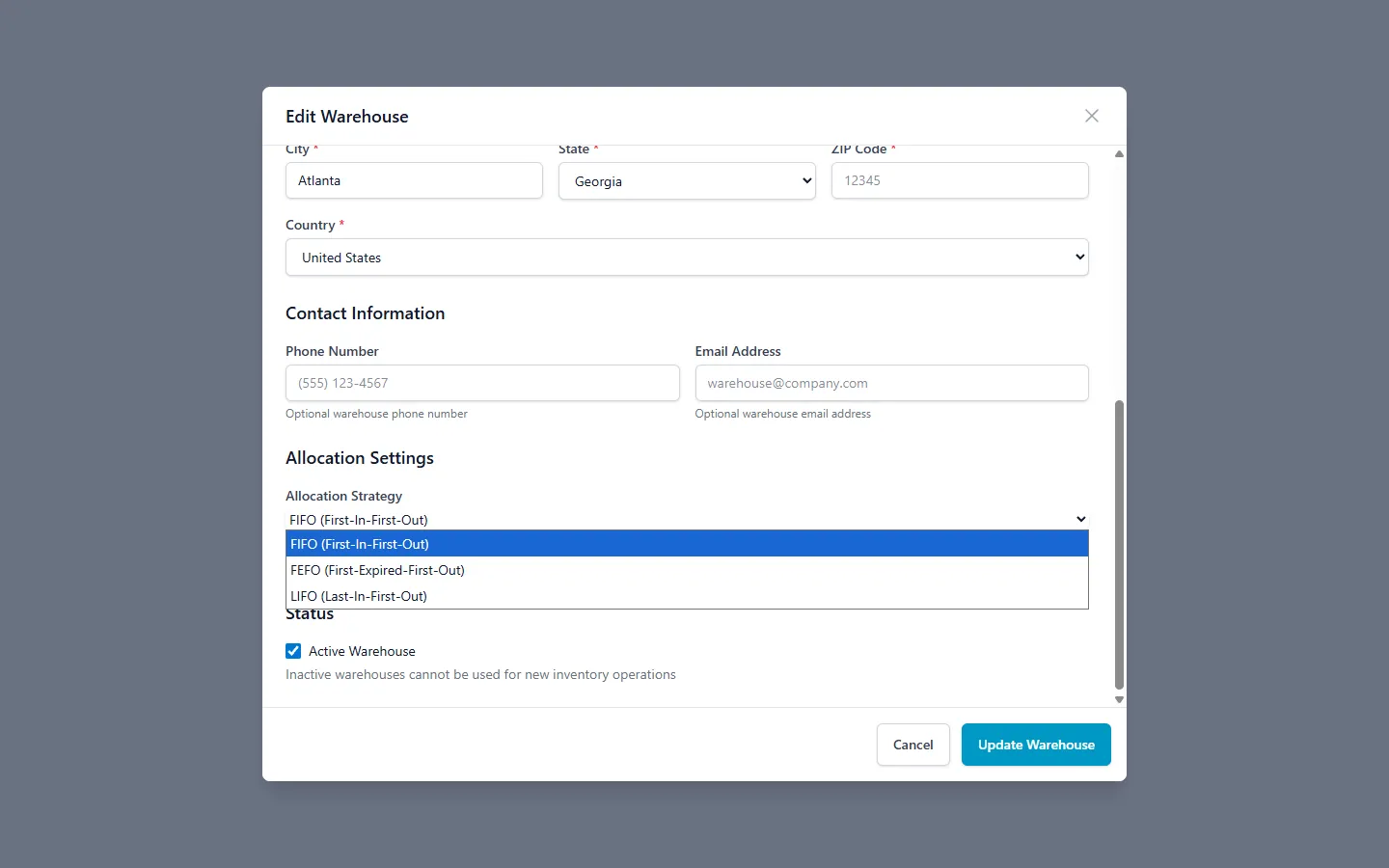
Step 1: Configure Warehouse Allocation Strategy
Set your warehouse’s default allocation strategy to FEFO in the warehouse settings. This applies to all orders processed through that warehouse unless overridden at the order level.
You can configure different strategies for different warehouses. A food distribution center might use FEFO while a general merchandise warehouse uses FIFO — both operating within the same ZoraTech instance.
Step 2: Capture Expiration Dates During Receiving
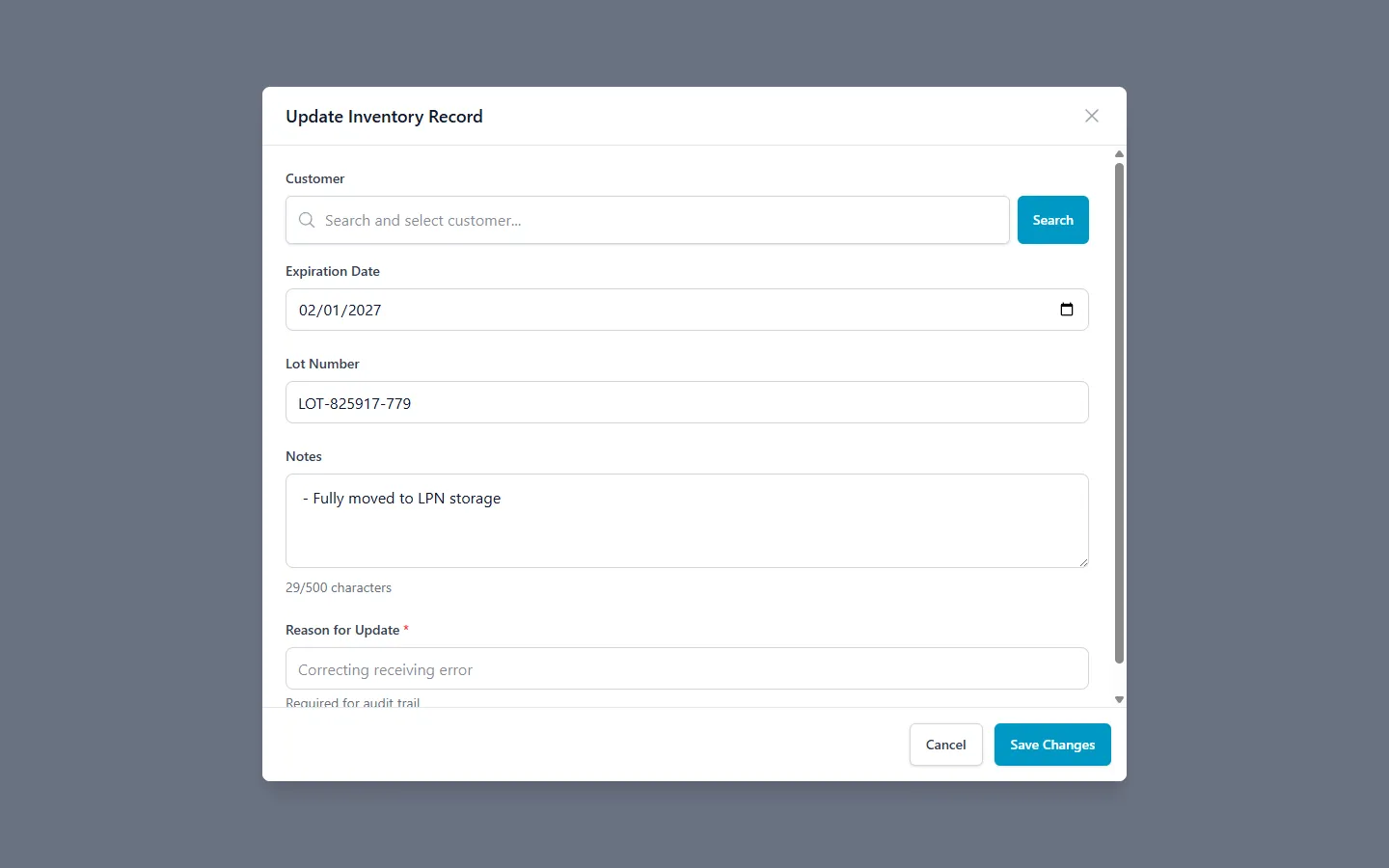
When receiving inventory, enter the expiration date for each product or lot. ZoraTech stores this at the inventory record level, meaning different lots of the same product can have different expiration dates.
For products that do not have expiration dates, leave the field empty. These items will still be allocated but will appear after all dated inventory in the FEFO sequence.
Step 3: Override Strategy Per Order (Optional)
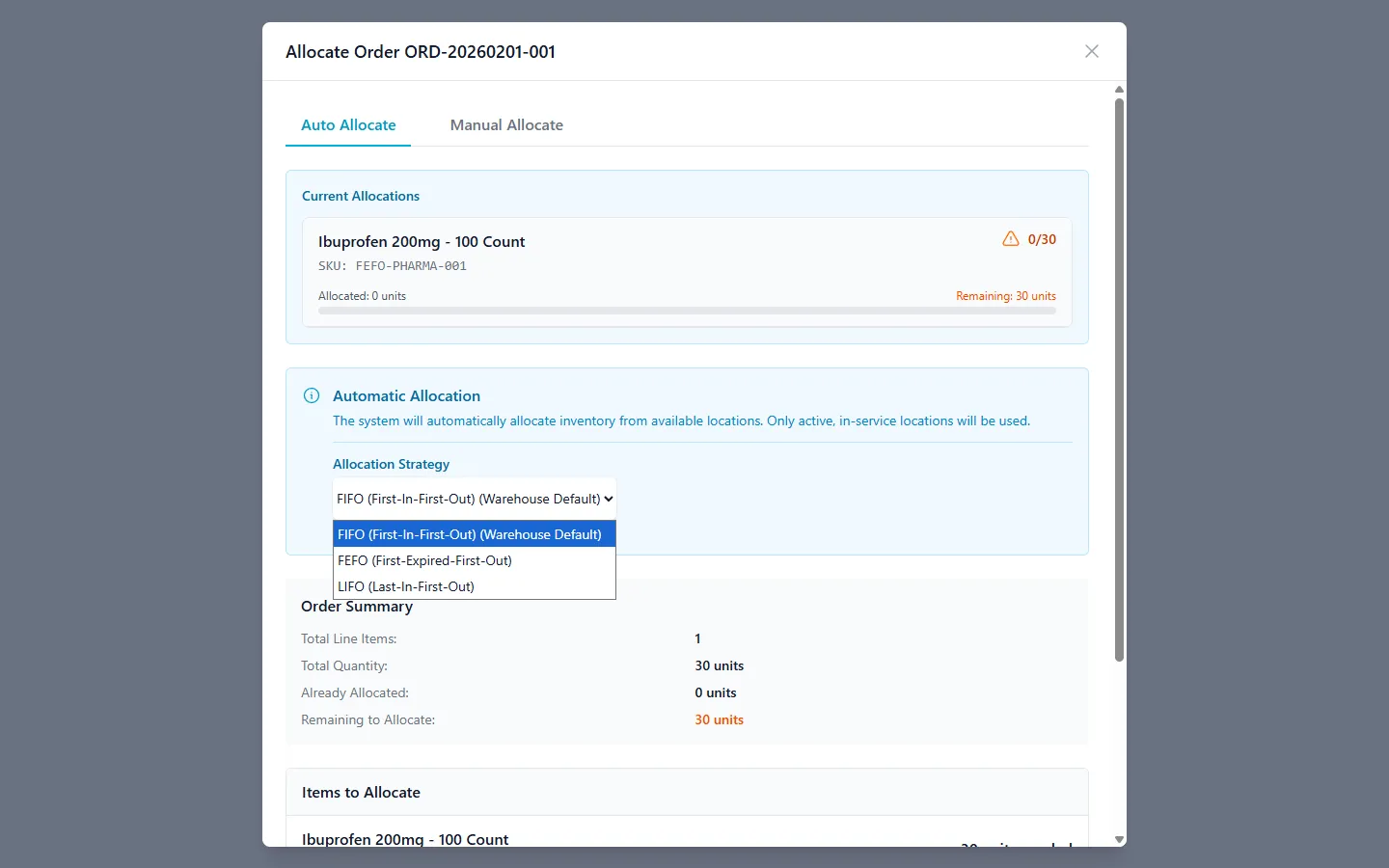
For specific orders that require a different allocation approach, you can override the warehouse default when allocating. The allocation modal provides a strategy selector that lets you switch between FEFO, FIFO, and LIFO on a per-order basis.
This is useful when a customer requests the freshest possible product (override to LIFO) or when you need to clear oldest stock regardless of expiration (override to FIFO).
Best Practices for FEFO Operations
Getting the most value from FEFO requires consistent data entry and clear operational procedures.
1. Capture Expiration Dates at Every Receiving Touchpoint
FEFO is only as accurate as your expiration data. Make expiration date entry a mandatory step in your receiving workflow. Missing dates push inventory to the back of the allocation queue, which may not reflect actual product urgency.
2. Use Lot Numbers to Track Batches
Pair expiration dates with lot numbers for traceability. If a recall occurs, lot-level tracking lets you identify exactly which inventory is affected and where it was shipped.
3. Monitor the Expiring Soon Indicator
Review inventory flagged as expiring within 30 days regularly. These items should be prioritized for allocation or flagged for promotional pricing before they become unsellable.
4. Set Receiving Standards for Minimum Remaining Shelf Life
Establish a policy for minimum acceptable shelf life at receiving. Many warehouses reject inbound shipments where products have less than 60-75% of their total shelf life remaining. This prevents short-dated inventory from entering your system in the first place.
5. Combine FEFO with Location Priorities
Use ZoraTech’s location priority system alongside FEFO for maximum efficiency. Assign higher priorities to forward pick locations so the allocation engine selects the most accessible, soonest-to-expire inventory first.
6. Review Expired Inventory Regularly
Run periodic checks for inventory that has passed its expiration date. Expired items should be quarantined, written off, or disposed of according to your standard operating procedures.
7. Train Staff on Expiration Visibility
Ensure your warehouse team understands the color-coded expiration badges and how FEFO affects their pick sequences. When staff understand why the system routes them to specific locations, pick accuracy improves.
Key Takeaways for FEFO Adoption
Adopting FEFO as your allocation strategy delivers measurable improvements across several operational areas:
- Waste reduction — items closest to expiration ship first, minimizing spoilage
- Regulatory compliance — automated date-based allocation supports FDA, GMP, and HACCP requirements
- Customer satisfaction — customers receive products with maximum remaining shelf life
- Operational clarity — color-coded badges and strategic allocation remove guesswork from picking
- Flexible configuration — set defaults per warehouse, override per order
- Lot traceability — expiration dates paired with lot numbers enable recall readiness
Frequently Asked Questions
What happens to inventory without an expiration date under FEFO?
Undated inventory is allocated last, after all dated inventory has been considered. They follow the secondary sort order of received date and then creation date. This means undated inventory is not skipped — it is simply deprioritized in favor of items that have a known expiration timeline.
Can I use FEFO for some products and FIFO for others?
The allocation strategy is set at the warehouse level, but you can override it on individual orders. If you manage products with mixed shelf-life requirements, you can either separate them into different warehouses with different default strategies or use per-order overrides when allocating.
How does FEFO handle items with the same expiration date?
FEFO falls back to secondary tiebreakers when multiple records share the same expiration date. The item with the earliest received date is allocated first. If received dates also match, the item with the earliest system creation date takes precedence. This ensures a consistent, predictable allocation order.
Does FEFO work with LPN (container) tracking?
Yes. ZoraTech tracks expiration dates through LPN-linked inventory records. Each container inherits the expiration status of its contents, and the FEFO allocation engine considers containerized inventory alongside loose inventory when building pick lists.
What is the expiring soon threshold?
ZoraTech flags inventory as expiring soon when it is within 30 days of its expiration date. This threshold triggers a yellow status badge in inventory views and allocation modals, providing advance warning to warehouse staff.
Can I switch from FIFO to FEFO on an existing warehouse?
Yes. Changing the allocation strategy in your warehouse settings takes effect immediately for all future order allocations. Existing allocated orders are not retroactively re-allocated. Ensure your inventory records have expiration dates populated before switching, as undated records will fall to the bottom of the allocation priority.
FEFO is one of the simplest changes you can make to immediately reduce waste and improve compliance. A single configuration change puts expiration dates at the center of your allocation logic — no workflow disruption, no retraining, just smarter picking from day one.
Ready to reduce waste and streamline your expiration management? Reach out to our team at zoratech.io to see how FEFO fits into your warehouse operation, or visit the documentation for detailed configuration guides.