Warehouse Location Priorities: The Complete Guide to Optimizing Storage and Putaway
What are warehouse location priorities and how do they work? Learn how to set up a priority-based putaway system that reduces travel time, maximizes storage efficiency, and keeps fast-moving products in prime locations.

TL;DR: Location priorities are a 1-10 ranking system that tells your WMS which storage spots to fill first. Lower numbers = higher priority. Set prime locations (near shipping) as priority 1-3, standard storage as 4-6, and overflow areas as 7-10. This simple setup can reduce putaway time by 30% and keep your fastest-moving products in the most accessible spots.
Every warehouse manager knows the frustration: products stored in random locations, workers walking unnecessary miles, and valuable prime storage space sitting empty while distant corners overflow. The solution? Location priorities—a systematic approach to controlling where products go in your warehouse.
In this guide, we’ll explain what location priorities are, how they work in a WMS like ZoraTech, and share proven best practices for organizing your warehouse efficiently.
What Are Warehouse Location Priorities?
Location priorities are a numerical ranking system (typically 1-10) that determines which storage locations your warehouse management system suggests first during putaway. When new inventory arrives, the WMS automatically recommends optimal storage spots based on these priority settings.
Think of it like a preference list for your warehouse:
- Priority 1-3: Prime locations you want filled first (closest to shipping, easiest to access)
- Priority 4-6: Standard storage areas (default setting)
- Priority 7-10: Overflow and backup storage (distant corners, high racks)
The key rule: Lower numbers = higher priority. A location with priority 1 will always be suggested before a location with priority 5.
| Priority Range | Classification | Typical Use |
|---|---|---|
| 1-3 | High Priority | Prime picking locations, ground level, near shipping |
| 4-6 | Medium Priority | Standard storage, default for most locations |
| 7-10 | Low Priority | Overflow, high racks, distant areas, seasonal storage |
Why Do Location Priorities Matter for Warehouse Efficiency?
Without a priority system, putaway becomes a guessing game. Workers might store fast-moving items in distant corners while leaving prime real estate empty. Research shows that optimized slotting and location priorities can reduce travel time by 20-30% in typical warehouse operations.
Location priorities solve critical warehouse problems:
- Reduced travel time — Workers walk less when convenient locations fill first
- Maximized space utilization — Prime storage fills before overflow areas get used
- Faster order picking — Fast-moving items stay in easy-to-reach spots
- Consistent organization — Similar products stay in designated zones
- Lower training burden — System suggestions guide new workers automatically
How Does a WMS Use Location Priorities? (ZoraTech Example)
When you receive products and need to store them, ZoraTech’s intelligent putaway system calculates a composite score for each available location. Priority is the largest factor, but not the only one.
The Putaway Scoring Algorithm
| Factor | Weight | What It Measures |
|---|---|---|
| Priority Score | 40% | Your assigned location priority (1-10) |
| Empty Location Bonus | 25% | Prefers empty bins to reduce product mixing |
| Same Product Bonus | 20% | Consolidates identical SKUs together |
| Capacity Utilization | 10% | Targets 60-80% utilization sweet spot |
| Pick Face Priority | 5% | Positions fast movers in primary picking zones |
Putaway Scoring Example
Let’s say you receive 100 units of Widget-A. ZoraTech evaluates available locations:
Location A1-01 (Priority 2, Empty)
- Priority Score: 36 points (high priority = high score)
- Empty Bonus: 25 points
- Total: ~61 points ← Top recommendation
Location B2-03 (Priority 5, Has Widget-A already)
- Priority Score: 24 points
- Same Product Bonus: 16 points
- Total: ~40 points ← Second choice
Location C4-07 (Priority 8, Empty)
- Priority Score: 12 points
- Empty Bonus: 25 points
- Total: ~37 points ← Third choice
The system recommends A1-01 first because it combines a high priority location with the benefits of being empty.
How to Set Up Location Priorities in ZoraTech
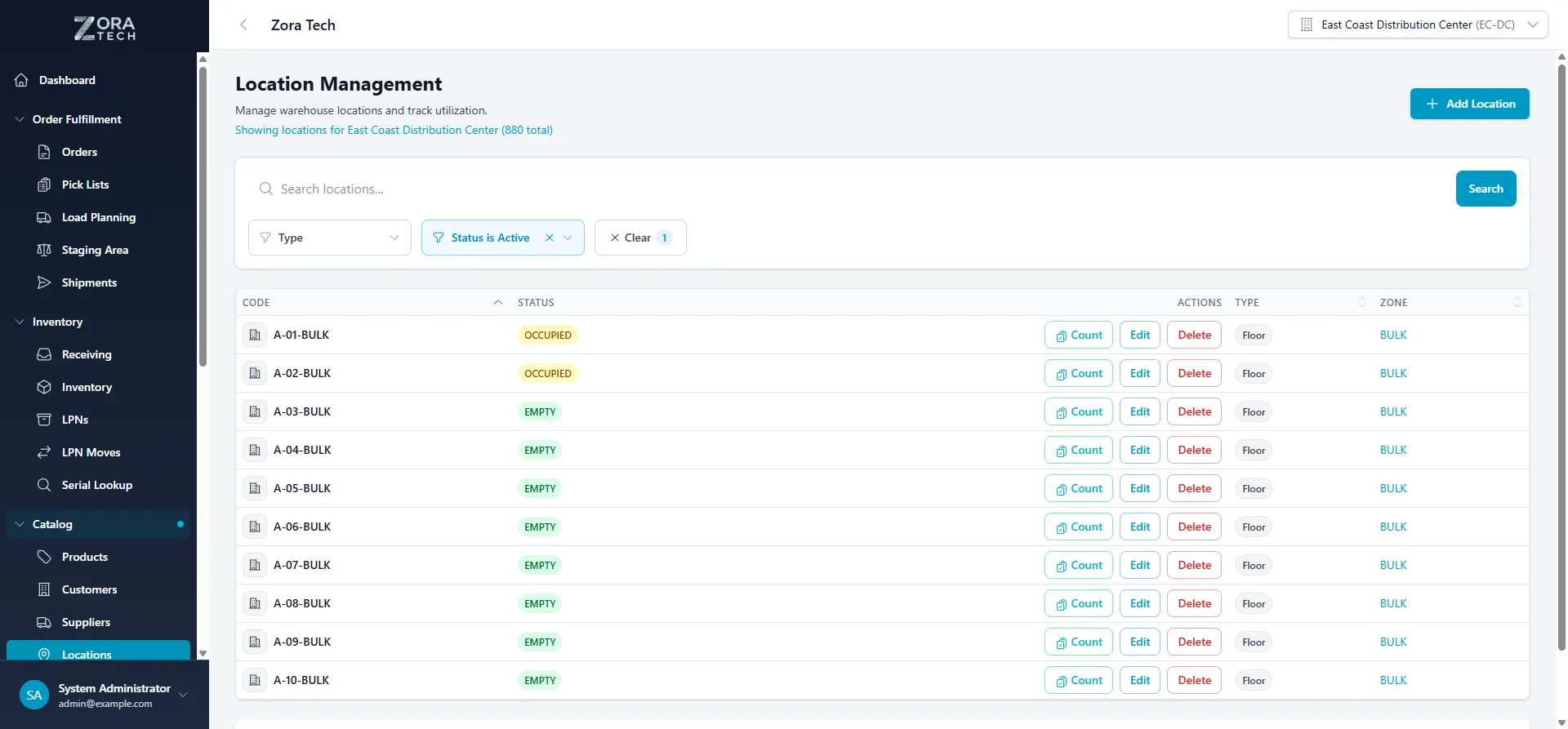
Step 1: Access Location Settings
- Navigate to Catalog → Locations in the main menu
- Click on any location to open its details
- Select Edit to modify settings
Step 2: Configure the Priority Value
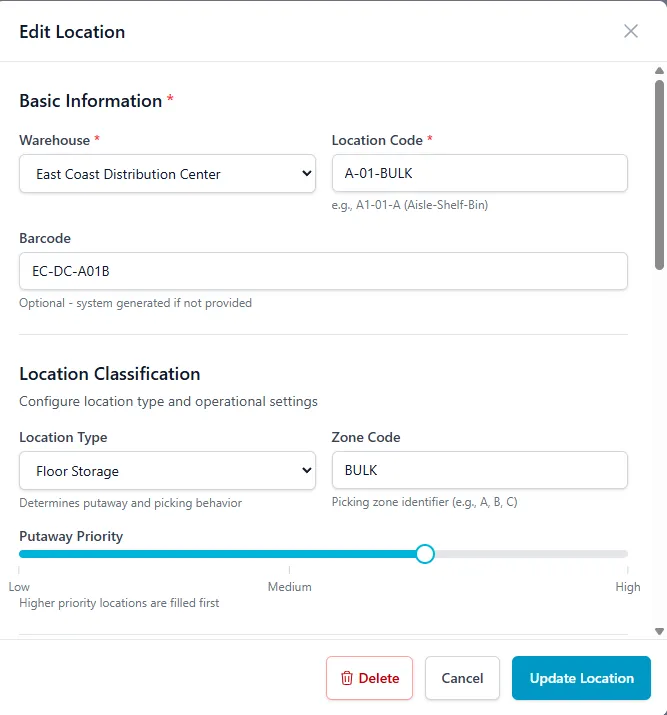
In the location edit screen, find the Putaway Priority slider (1-10 scale):
- 1-3 — High priority (fill these locations first)
- 4-6 — Medium priority (standard storage, default is 5)
- 7-10 — Low priority (overflow/backup)
Remember: Lower priority numbers = higher putaway preference. A location set to priority 1 will always be suggested before priority 5.
Step 3: Bulk Update Priorities via CSV Import
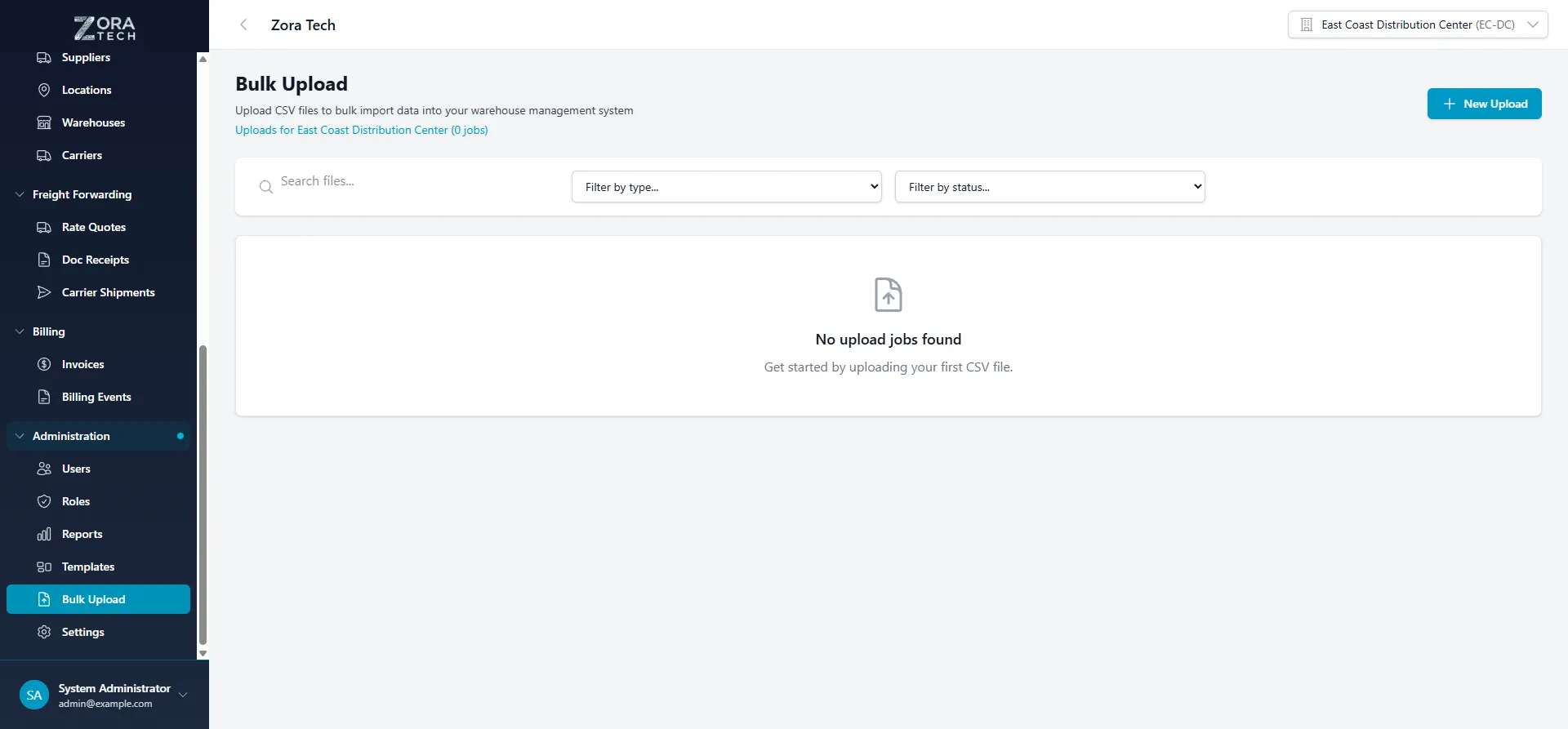
For setting priorities across many locations at once:
- Go to Administration → Bulk Upload
- Download the locations template CSV
- Fill in or update the
putaway_prioritycolumn (1-10) - Upload the CSV to apply changes to multiple locations
The CSV supports all location fields including location_type, zone_code, temperature_controlled, hazmat_approved, and pick_face_location.
7 Best Practices for Warehouse Location Priorities
1. Create Strategic Warehouse Zones
Divide your warehouse into zones based on product velocity:
Zone A — High Velocity (Priority 1-2)
- Located nearest to shipping/packing stations
- Contains your top 20% best-selling SKUs (often 80% of picks)
- Mark as “Pick Face” locations in your WMS
Zone B — Medium Velocity (Priority 3-5)
- Standard storage for regular movers
- Bulk of your inventory lives here
- Easy access but not prime real estate
Zone C — Low Velocity/Overflow (Priority 6-10)
- Distant corners, high shelves, hard-to-reach spots
- Seasonal items, slow movers, backup stock
- Only used when Zones A and B are full
2. Match Priorities to Physical Accessibility
| Location Type | Suggested Priority | Reasoning |
|---|---|---|
| Ground-level bins | 1-3 | Easy access, no equipment needed |
| Eye-level shelves | 2-4 | Ergonomic picking height |
| Low shelves | 4-6 | Requires bending |
| High racks (forklift) | 6-8 | Requires equipment and time |
| Mezzanine/distant | 8-10 | Maximum travel time |
3. Use Location Types Strategically
ZoraTech supports different location types that work alongside priorities:
| Type | Description | Typical Priority |
|---|---|---|
| SHELF | Shelving for smaller items | 1-3 |
| FLOOR | Open floor space for pallets | 2-4 |
| RACK | Standard pallet racking | 3-5 |
| BULK | Large storage for overflow | 6-8 |
Pro tip: Set your main floor locations as priority 2, but bulk overflow floor areas as priority 8.
4. Leverage Special Location Designations
Pick Face Locations — Mark primary picking spots. The system gives Storage Class A products (fastest-moving 20% of SKUs) a bonus score, automatically directing high-velocity items to prime positions.
Temperature Controlled — For cold storage. ZoraTech automatically restricts temperature-sensitive products to marked locations regardless of priority.
Hazmat Approved — For hazardous materials. This is a hard constraint—hazmat products can only go in approved locations, even if other locations have higher priority.
Storage Class Restriction — Limit specific locations to certain product classes (e.g., “ELECTRONICS”, “FRAGILE”).
Max Weight Per Unit — Prevent heavy items from being placed in locations that can’t support them.
5. Keep Your Priority Structure Simple
A common mistake is creating too many priority levels. Three tiers work best for most warehouses:
- Priority 2: Prime locations (leave 1 for emergencies)
- Priority 5: Standard storage (the default)
- Priority 8: Overflow and backup
This structure is easy to understand, maintain, and explain to warehouse staff.
6. Review and Adjust Priorities Regularly
Your priority setup shouldn’t be “set and forget”:
- Monthly: Review velocity reports and adjust for changing demand patterns
- Seasonally: Shift priorities for seasonal products (holiday items get priority 2 in Q4)
- After layout changes: Update priorities when you reorganize physical space
- After ABC analysis: Reclassify products and adjust their target zones
7. Train Your Team on Why Priorities Matter
Workers who understand the system trust the recommendations. When they trust recommendations:
- Putaway suggestion acceptance rates exceed 90%
- Fewer overrides mean better organization
- New employees get up to speed faster
What Happens When High-Priority Locations Are Full?
ZoraTech has built-in fallback strategies:
- Relaxed Constraints — If single-SKU locations are full, the system looks for locations with available space, even if they contain other products
- Overflow Locations — Automatically suggests FLOOR and BULK locations with the most available space
- Manual Override — Alerts warehouse staff to manually select a location or free up space
This ensures putaway never completely stops—there’s always a path forward, even during peak receiving periods.
Key Metrics to Track After Implementation
Monitor these KPIs to measure the impact of your location priority setup:
| Metric | Target | What It Indicates |
|---|---|---|
| Average putaway time | 20-30% decrease | Workers traveling less |
| Pick path distance | 15-25% decrease | Fast movers in prime spots |
| Zone A utilization | >80% before Zone C fills | Priority system working |
| Suggestion acceptance rate | >90% | Workers trust the system |
Common Location Priority Mistakes to Avoid
Setting everything as high priority — If every location is priority 1, nothing is prioritized. Be selective about prime real estate.
Ignoring capacity constraints — Priorities don’t override physics. A full high-priority location won’t be suggested. Ensure adequate capacity at each priority level.
Forgetting product restrictions — Temperature, hazmat, and storage class constraints take precedence over priorities. A hazmat product won’t go in an unapproved priority-1 location.
Never reviewing the setup — Product velocity changes over time. What was a fast mover last year might be slow this year.
Frequently Asked Questions
What is the best priority number for warehouse locations?
There’s no single “best” number—it depends on the location’s accessibility and your workflow. Use priority 1-3 for prime locations near shipping, 4-6 for standard storage, and 7-10 for overflow. Most warehouses work well with just three tiers: 2, 5, and 8.
How do location priorities differ from warehouse slotting?
Location priorities and slotting are related but distinct. Slotting determines which products belong in which zones (e.g., fast movers in Zone A). Priorities determine the fill order within those zones (which specific bin to use first). Use both together for optimal results.
Should I set any locations to priority 1?
Reserve priority 1 for emergencies or special situations. Starting your prime locations at priority 2 gives you flexibility to add something even more urgent later without restructuring your entire system.
How often should I review location priorities?
Review monthly for demand changes, quarterly for seasonal adjustments, and immediately after any warehouse layout changes. Also review after running ABC velocity analysis on your products.
Can location priorities override hazmat or temperature requirements?
No. Safety and compliance constraints are hard rules that take precedence over priorities. A hazmat product will never be suggested for a non-approved location, even if that location has priority 1.
What’s a good putaway suggestion acceptance rate?
Target 90% or higher. If workers frequently override suggestions, either your priorities need adjustment or your team needs training on why the system makes its recommendations.
Getting Started Checklist
Ready to optimize your warehouse with location priorities?
- Audit your current layout — Walk the floor and identify zones (prime, standard, overflow)
- Map accessibility — Note which locations are easiest to reach without equipment
- Set initial priorities — Start with the simple three-tier system (2, 5, 8)
- Configure in your WMS — Update location settings individually or via bulk import
- Train your team — Explain why the system suggests certain locations
- Monitor metrics — Track putaway time and acceptance rates for 30 days
- Refine and adjust — Use data to fine-tune priorities over time
Location priorities are one of the highest-impact settings in your WMS. A few hours of thoughtful configuration can save hundreds of hours of wasted walking and searching over the course of a year—and keep your warehouse running at peak efficiency.
Have questions about setting up location priorities? Reach out to our team at zoratech.io or check the documentation for detailed setup guides.